



Backup Camera Not Working on Your Chevy? How to Diagnose and Fix It
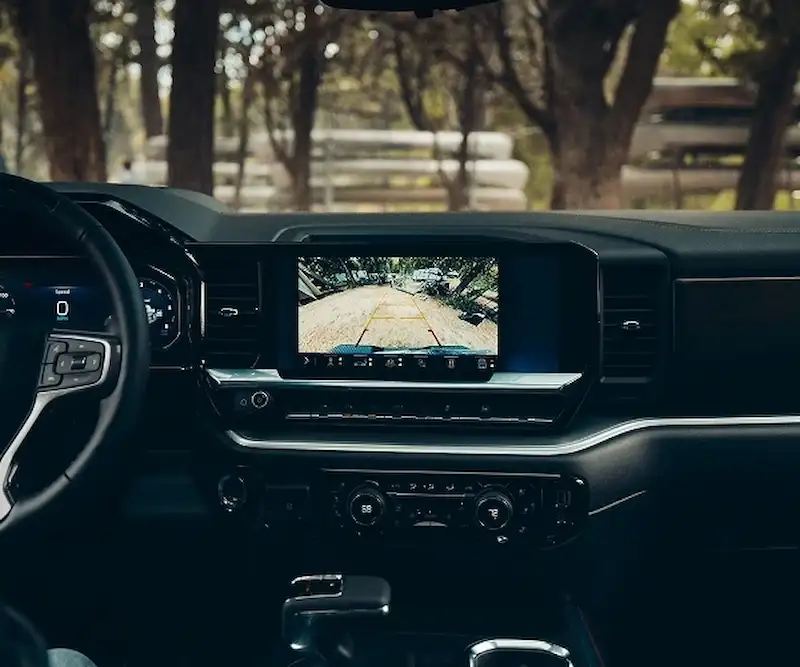
You shift into reverse, glance at the screen — and get a black rectangle, a frozen image, or a distorted mess that’s worse than no camera at all. A backup camera not working is more than a frustrating inconvenience; it’s a safety system failure, and in Orlando’s busy parking lots and narrow residential streets, it’s one that needs a quick resolution. The good news is that backup camera issues have a defined list of causes, and many of them are diagnosable — and fixable — without a service visit.
This guide covers the most common reasons a Chevrolet backup camera stops functioning, what you can check yourself before scheduling an appointment, and when the problem requires a certified technician to diagnose properly. Starling Chevrolet’s Certified Service center in Orlando is equipped to diagnose and repair backup camera faults on any Chevrolet model — from Equinox and Traverse to Silverado and Tahoe. Reach the service team directly at (407) 917-5348.
The Most Common Reasons a Backup Camera Stops Working
Backup cameras fail for a handful of well-documented reasons. Identifying which category applies to your situation narrows down the fix before any disassembly or parts ordering happens.
Dirty or obstructed lens. The most frequent cause — and the easiest to fix. Road grime, mud, condensation, or insects on the lens will degrade or completely block the image. On Silverado trucks, the camera sits in the tailgate handle or near the license plate, where it picks up road debris constantly. On Equinox and Traverse, the camera is mounted above the rear hatch, where water streaks and dust accumulate. A dirty lens is often mistaken for a camera failure.
Loose or corroded wiring connection. On trucks and SUVs with a standard tailgate or power liftgate, the camera wiring runs through a flexible harness at the hinge point. Repeated open-and-close cycles stress this connection over time. Florida’s humidity accelerates corrosion at connector terminals, causing intermittent or complete camera loss.
Software or infotainment system glitch. The backup camera feeds through the vehicle’s infotainment head unit. A software freeze, failed update, or corrupted cache can prevent the camera from initializing when the vehicle enters reverse. This is a common cause of sudden camera failure on vehicles that were otherwise working fine.
Blown fuse. Chevrolet backup cameras are on a dedicated circuit. A blown fuse cuts power entirely and produces a blank or unavailable camera screen in reverse. Fuse failures are typically caused by a short in the wiring — replacing the fuse without addressing the short will result in it blowing again.
Water intrusion. Camera housings are sealed at the factory, but Florida’s UV exposure degrades rubber seals faster than in temperate climates. Water inside the housing causes image fogging, color distortion, or complete failure as it damages the image sensor.
Physical damage or heat-related camera failure. Minor backing collisions, pressure washing aimed directly at the camera, or cumulative heat exposure from Florida sun can damage the image sensor itself. This is the most expensive category and typically requires a camera unit replacement.
What to Check Before Scheduling a Service Appointment
Several backup camera problems can be ruled out — or resolved — without a technician. Work through these steps in order before calling for service:
Step 1: Clean the lens. Use a soft microfiber cloth with a gentle glass cleaner or plain water. No abrasives, no solvent-based cleaners. If the image clears up after cleaning, the camera is functional. Include the lens in your regular wash routine going forward.
Step 2: Check display and camera settings. On Chevrolet’s infotainment systems, navigate to Settings > Camera > Rearview Camera to verify the camera is enabled. Some models allow the backup camera to be toggled off or to have its guidelines adjusted — confirm neither has been accidentally changed. A settings reset restores defaults if you’re unsure.
Step 3: Restart the infotainment system. Press and hold the infotainment power button for 10 or more seconds until the system reboots, or turn the vehicle off and back on. On models with a volume knob, pressing it for 10 seconds performs a soft reset. This resolves software-related camera failures on Equinox, Traverse, Silverado, Tahoe, and Suburban models that fail intermittently.
Step 4: Inspect the tailgate or liftgate wiring harness (Silverado, Colorado, Traverse, and full-size SUV owners). With the tailgate or liftgate open, locate the wiring harness that passes through the hinge area. Check for visible fraying, pinching, or a connector that has worked loose. Reconnecting a loose plug — or avoiding a position where the harness is kinked — can restore camera function immediately.
Step 5: Check the fuse. Your owner’s manual identifies the backup camera fuse location and amperage. A visual check for a broken filament (or a continuity test with an inexpensive multimeter) confirms a blown fuse. Replacement fuses cost a few dollars. If the fuse blows again quickly after replacement, there’s a wiring fault that needs professional diagnosis.
When a Backup Camera Failure Signals a Deeper Problem
Some symptoms indicate the backup camera issue won’t be resolved with cleaning, rebooting, or a fuse replacement:
Consistent black screen that persists across multiple restarts and doesn’t respond to settings changes is typically a sign of camera unit failure, a severed wiring harness, or a head unit fault. None of these resolve on their own.
Persistent image distortion — color shifts, horizontal bars, or a foggy image that doesn’t clear after cleaning — usually indicates water intrusion or internal image sensor damage. The camera housing needs to be inspected and likely replaced.
Intermittent operation is the signature symptom of a wiring harness problem. The camera works sometimes and fails others because a partially severed wire is making and losing contact as the harness flexes. This worsens over time and eventually becomes a complete failure.
Infotainment error messages or fault codes are the clearest diagnostic signal. GM’s infotainment and vehicle systems log diagnostic trouble codes (DTCs) for camera-related faults. A technician scan reads these codes precisely — identifying whether the fault is at the camera, in the wiring, or at the head unit — before any parts are ordered. This is the fastest path to an accurate repair estimate.
A Florida-specific note: vehicles that spend extended time parked outdoors in direct sun — particularly dark-colored trucks and SUVs — experience camera housing seal degradation at higher rates due to UV exposure and heat cycling. If your Chevrolet is more than five years old and the backup camera has never been inspected, including it at your next service visit is worthwhile preventive maintenance.
Backup Camera Diagnosis and Repair at Starling Chevrolet Certified Service
When the self-diagnosis steps don’t resolve the issue, Starling Chevrolet’s Certified Service center in Orlando provides a structured diagnostic process that identifies the problem before any work begins:
Diagnostic scan: GM-approved scan tools read all stored and pending DTCs from the infotainment, body control module, and camera system. This identifies the fault location — camera unit, wiring harness, or head unit — without guesswork.
Physical inspection: Certified technicians inspect the camera lens and housing for seal integrity, examine the tailgate or liftgate wiring harness at the hinge points for wear, and test connector terminal condition. This step catches wiring issues that don’t always generate a fault code.
Parts and warranty check: If a camera replacement is required, Starling uses OEM-compatible parts matched to your specific Chevrolet model and build date. Before any out-of-pocket repair is authorized, the service team verifies whether the fault is covered under your factory warranty (3 years/36,000 miles on most new Chevrolets) or any extended coverage you carry.
Schedule a backup camera diagnostic appointment at the Starling Certified Service center online or call (407) 917-5348. Service hours: Mon–Fri 7:30 AM–6:30 PM, Sat 8:00 AM–5:00 PM. Check current service and parts specials before your visit and ask your service advisor about any applicable promotions.
Preventing Backup Camera Problems Before They Start
A backup camera not working is often preventable with a few routine habits — particularly important for vehicles driven in Florida’s environment:
Clean the lens regularly. Monthly is sufficient for typical Central Florida driving. Add it to your car wash routine — it takes 30 seconds and prevents the single most common backup camera complaint.
Inspect the tailgate harness annually. For Silverado, Colorado, Silverado HD, Traverse, and Tahoe owners: ask your service technician to inspect the hinge-area wiring during any oil change. Catching a fraying wire before it severs completely costs far less than diagnosing a complete camera failure later.
Avoid directing high-pressure water at the camera housing. Pressure washers — even at moderate settings — can compromise seals over repeated washes, particularly on cameras more than a few years old. Angle the wand away from the camera area and use a cloth for that section.
Act on intermittent issues early. A camera that works sometimes is a camera on its way to not working at all. Addressing an intermittent fault — usually a wiring connection — is significantly cheaper than waiting for a full failure.
If your Chevrolet’s backup camera needs attention, contact the Starling service team online or call (407) 917-5348. Starling Chevrolet is located at 13155 South Orange Blossom Trail, Orlando, FL 32837, serving drivers from Orlando, Kissimmee, Lake Nona, and Hunters Creek. And if a recurring camera issue has you evaluating whether it’s time for a newer model with a fully integrated safety camera system, the Finance Center at Starling and the Instant Cash Offer tool make it easy to evaluate your options — call the sales team at (407) 917-6627 or browse the full 2026 Chevrolet lineup to see what’s available today.
Frequently Asked Questions
Why is my Chevy backup camera showing a black screen?
A black screen in reverse most commonly indicates one of four causes: a dirty camera lens blocking the image (check and clean this first), a software glitch in the infotainment system (try a hard reboot by holding the power button 10+ seconds), a blown backup camera fuse (check the owner’s manual fuse diagram), or a failed camera unit requiring replacement. If cleaning the lens and rebooting don’t restore the image, schedule a diagnostic at Starling Chevrolet Certified Service or call (407) 917-5348 — a technician scan identifies the fault location before any parts are ordered.
Can I drive my Chevrolet with a backup camera that’s not working?
Legally, yes — backup cameras are required equipment on new vehicles sold after 2018, but driving an existing vehicle with a failed camera is not illegal. However, backup cameras are a primary rear-visibility safety aid, and operating without one increases the risk of low-speed collisions, particularly in parking lots and driveways. Most Chevrolet models also have rear parking sensors that remain functional independently of the camera — check whether yours are active. For anything more than short-term use, scheduling a repair is the safer path. Contact Starling Chevrolet at (407) 917-5348 to arrange a service appointment.
How much does it cost to repair a backup camera on a Chevrolet?
Repair cost depends on the root cause. A blown fuse is a few dollars in parts and minimal labor. A wiring harness repair typically runs in the range of one to several hours of labor plus parts. A camera unit replacement — the most common repair after DIY steps don’t resolve the issue — varies by model but is generally a moderate-cost repair. If your vehicle is under the factory 3-year/36,000-mile warranty, camera faults may be covered at no charge. Before authorizing any out-of-warranty repair, the Starling service team verifies all applicable coverage. Call (407) 917-5348 or schedule online for a diagnostic estimate.
How long does backup camera repair take at a dealership?
The diagnostic scan itself typically takes under an hour. A simple repair — fuse replacement, connector reconnection, or software update — can often be completed the same day. A camera unit replacement generally requires a few hours of labor, depending on the model and parts availability. Starling Chevrolet’s Certified Service center schedules appointments Mon–Fri 7:30 AM–6:30 PM and Sat 8:00 AM–5:00 PM. Schedule your appointment at starlingchevy.com/service/serviceapptform/ or call (407) 917-5348 to confirm parts availability before your visit.
0 comment(s) so far on Backup Camera Not Working on Your Chevy? How to Diagnose and Fix It